UDP hole punching
10min
11.02.2026.
Peer-to-peer communication sounds simple - until both peers are behind NAT. That's where UDP hole punching becomes essential.
- 1. Description of the Problem
- 2. Types of NAT
- 3. Explanation
- 4. Demonstration
- 5. Summary
1. Description of the Problem
Most applications today consist of a back-end service that runs on a server accessible to everyone, and a front-end that runs on the client. Usually, the client initiates a request to a server, and there is no problem with that, since the client can "see" the server. But what about applications where clients need to communicate with each other? Well, it is possible but it's not as trivial as with client-server communication. Clients are usually behind NATs or firewalls, which makes establishing direct communication difficult.
First, let's make a few things clear. A client has a private IP address, and when it wants to access the internet, it sends a request through a router that has a public IP address. The router keeps a temporary mapping between the client's private IP and port and its own public IP and port, allowing it to forward responses back to the correct client. This process is called Network Address Translation (NAT). You can read more about it in this post, but for this post, the types of NAT are important.
2. Types of NAT
There are a few main types of NAT defined by how they map internal IP addresses and ports to external ones.
- Full Cone NAT - this is the least restrictive type of NAT. Once a private IP and port are mapped to a public IP and port, any external host can send traffic to that internal address through the same mapping.
- Restricted Cone NAT - this NAT allows an external host to send traffic to the same mapping only if the internal client has previously contacted that host.
- Port Restricted Cone NAT - same as Restricted Cone NAT, but the rule applies not only to the host's IP, but also to the port.
- Symmetric NAT - this is the most restrictive type of NAT. For each destination, a new mapping is created. This type of NAT is commonly found in mobile and corporate networks.
If a client is using Symmetric NAT, it is impossible to successfully perform UDP hole punching. In the next section, a concrete technique is explained, which will clarify why this is the case and how the problem can be solved.
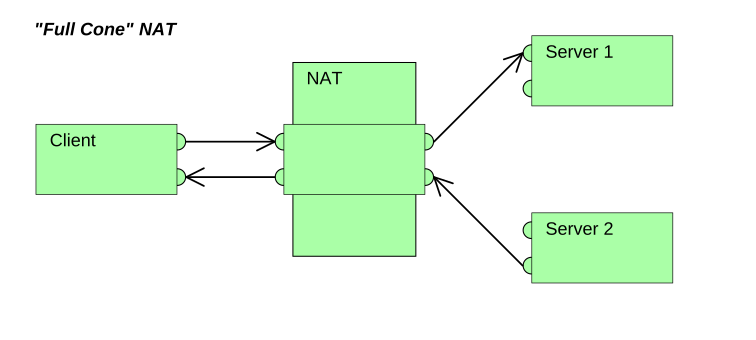 2.1 Representation of Full Cone NAT
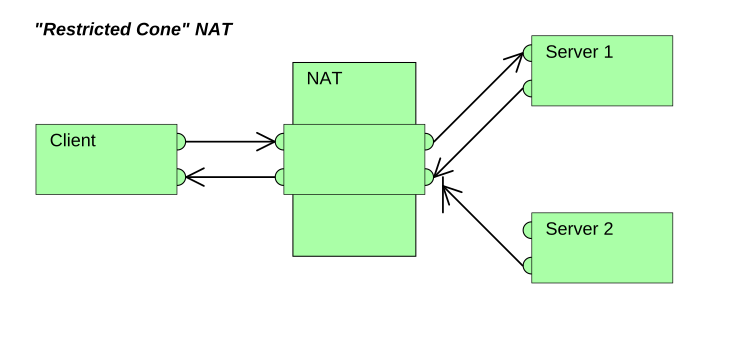 2.2 Representation of Restricted Cone NAT
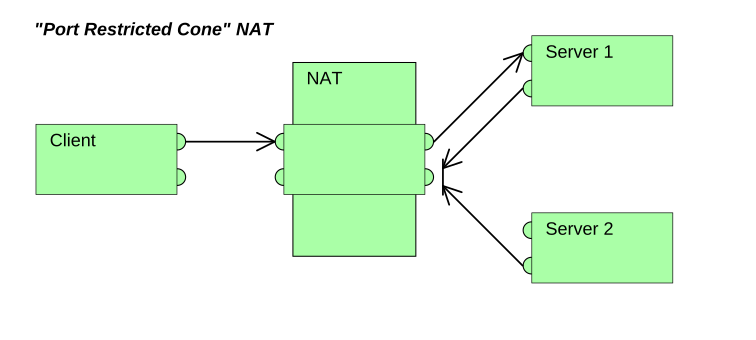 2.3 Representation of Port Restricted Cone NAT
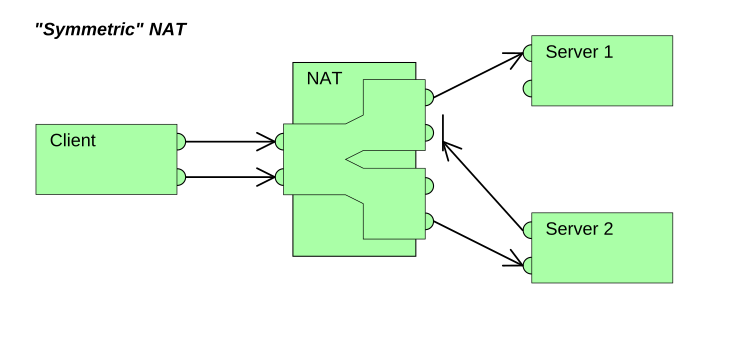 2.4 Representation of Symmetric NAT
Images taken from https://commons.wikimedia.org made by Christoph Sommer.
3. Explanation
Let's start with the name itself, UDP hole punching. Why UDP? UDP is a much simpler protocol than TCP. It does not require a connection to be established before data can be sent. You simply specify the destination address and port, set the payload, and you're ready to go. You can see what a UDP header looks like in Figure 3.1. If you open the UDP specification, you'll notice that there isn't much complexity to it, you can read it in one sitting (RFC 768). In this case, we use UDP because we want to leave all networking logic to the application layer. Although TCP hole punching is possible, it is outside the scope of this post. You can read about that technique in this work. 3.1 UDP Header
3.1 UDP HeaderThe term hole is used because we are essentially trying to “poke” a hole in the NAT by creating a valid mapping and then reusing it for communication with another address. The hole represents this temporary mapping in the NAT table. Punching refers to the process of deliberately creating that mapping ourselves.
The idea is simple: create a mapping in the NAT, discover the details of that mapping, share it with another peer, and then continue communication using that mapping.
When your device sends data to the internet, it usually doesn't need to know how the NAT handles ports and mappings. However, in this case, we *do* need that information. You can obtain it by using a STUN server (Session Traversal Utilities for NAT). There are public STUN servers available, for example, Google provides free ones that you can test using this website: https://icetest.info. A common example is
stun:stun.l.google.com:19302.Send this public IP:port to the other peer, and the UDP hole punching process can begin. You can choose any method to exchange this information. At this point, the type of NAT becomes important. If your NAT is Full Cone, the other peer only needs to know your public IP:port. If your NAT is Restricted Cone or Port Restricted Cone, you also need to know the peer's public IP:port, because you must first send data to that destination so the NAT allows incoming traffic from it. As shown in Figure 2.1, only with Symmetric NAT does a new mapping get created for each different destination. Because of this behavior, it is impossible to successfully complete UDP hole punching when using Symmetric NAT. To achieve communication that is as close as possible to peer-to-peer in this case, a relay server is required to proxy the traffic. A common solution to this problem is the TURN protocol (RFC 5766), which I will cover in another blog post.
Let's imagine
Peer1 and Peer2 want to chat. Neither peer has a public IP address. Here is the step-by-step process:1. Both peers send a UDP packet to a STUN server.
2. The NAT on each peer creates a temporary mapping.
3. The STUN server returns the public IP:port to each peer.
4. The peers exchange this information using any signaling mechanism.
5. Both peers start sending UDP packets to the destination they received. The first few packets may not pass through the NAT immediately.
Peer1 needs to send packets to Peer2 so the NAT allows incoming traffic from Peer2. The same applies in the opposite direction.6. Once both peers receive packets from each other, there is a NAT mapping on both sides and peers can start to communicate.
4. Demonstration
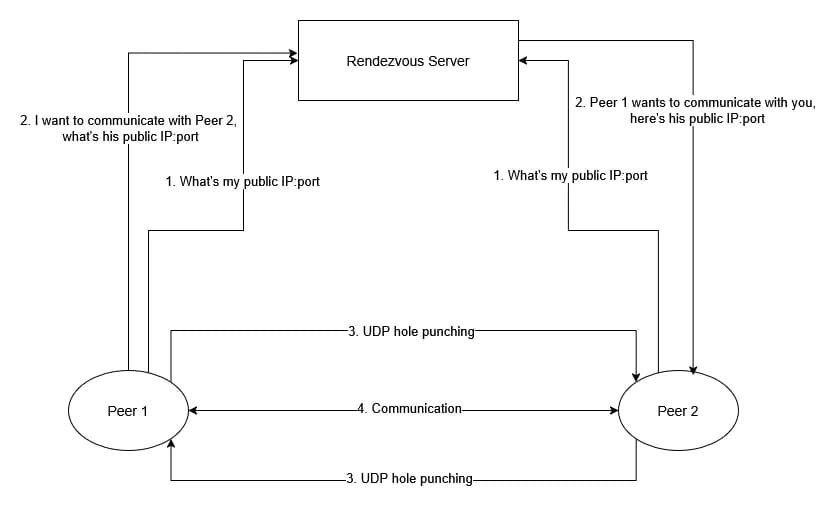
For the purpose of this blog, I created a simple application in Go to demonstrate how this works. It is a console-based chat application. There are two components in this application: Client and Rendezvous Server. The Client is the obvious part, it is the component you run on your PC, and it communicates with another PC running the same client application. There are several reasons why the Rendezvous Server exists. In theory, the process could work without it. Peers could contact a STUN server to discover their public IP:port and then exchange that information using any signaling mechanism. But the challenge should already be clear.
 4.1 Diagram
4.1 Rendezvous server
The server has several roles:
1. It determines the public IP:port of the peer that contacts it, stores it in memory, and returns a unique ID. Other peers can retrieve that information by providing the ID. In that sense, it partially imitates a STUN server.
2. If
Peer1 provides the ID of Peer2, the server returns Peer2's public IP:port. It also notifies Peer2 that Peer1 wants to communicate by providing Peer1's public IP:port. In other words, it organizes the meeting (French: rendez-vous).3. During the time between a peer registering with the server and starting the chat, the NAT mapping must remain active. Another responsibility of the server is therefore to help keep that mapping alive. This is achieved by the peer sending an empty UDP packet every N seconds (a keep-alive mechanism).
for {
		n, remoteAddr, err := conn.ReadFrom(buffer)

    ...

		data := buffer[:n]
		var message types.Message
		err = json.Unmarshal(data, &message)

    ...

		if message.Type == "REGISTRATION" {
			s.registerNewClient(remoteAddr)
		}
	}
func (s *Server) registerNewClient(remoteAddr net.Addr) {
    identifier := uuid.New().String()
    s.Clients[identifier] = types.IPAddressPair{
      Public: remoteAddr.String(),
    }

    messageToSend := types.Message{
      Type:    "REGISTRATION",
      Payload: identifier,
    }
            ...
for {
		n, remoteAddr, err := conn.ReadFrom(buffer)

    ...

		data := buffer[:n]
		var message types.Message
		err = json.Unmarshal(data, &message)

    ...

		if message.Type == "REGISTRATION" {
			s.registerNewClient(remoteAddr)
		}
	}
func (s *Server) registerNewClient(remoteAddr net.Addr) {
    identifier := uuid.New().String()
    s.Clients[identifier] = types.IPAddressPair{
      Public: remoteAddr.String(),
    }

    messageToSend := types.Message{
      Type:    "REGISTRATION",
      Payload: identifier,
    }
            ...
When the rendezvous server starts, it binds to an available UDP port and begins listening for incoming UDP packets. In Listing 4.1, you can see an infinite loop that continuously waits for packets sent to the server. If the received message is of type
REGISTRATION, the server generates a UUID for that client, stores the UUID together with the public IP:port from which the packet was received, and then returns the UUID to the client (as shown in Listing 4.2). In this implementation, the peer does not even need to know its own public IP:port. It only needs its assigned UUID. At this point, both peers are registered, but they still do not know how to reach each other directly.func (s *Server) startCommunicationHandler(w http.ResponseWriter,
r *http.Request) {
if r.Method == "POST" {
...
var startCommunication types.StartCommunication
err := json.NewDecoder(r.Body).Decode(&startCommunication)
if err != nil {
http.Error(w, err.Error(), http.StatusBadRequest)
return
}
clientAddr, ok := s.Clients[startCommunication.Peer]
...
json.NewEncoder(w).Encode(clientAddr)
clientInitiatorAddr, ok :=
s.Clients[startCommunication.PeerInitiator]
...
adrr, err := netip.ParseAddrPort(clientAddr.Public)
mess := types.Message{
Type: "INITIATE_CHAT",
Payload: clientInitiatorAddr.Public,
}
messBytes, err := json.Marshal(mess)
...
fmt.Println("SENDING UDP ON" + adrr.String())
_, err = s.Conn.WriteToUDPAddrPort(messBytes, adrr)
...
}
}
Listing 4.3 shows how the server handles the initiation of a chat session.
Peer1 sends an HTTP request containing its own identifier and the identifier of the peer it wants to communicate with. The server responds with Peer2's public IP:port. At the same time, it sends a UDP packet toPeer2 containing Peer1's public IP:port. This HTTP request acts purely as a signaling mechanism and is not part of the data path. For both peers, receiving this information signals that they can begin the UDP hole punching process.4.2 Client
As mentioned earlier, the Client component is the part of the application that runs on a user's PC. When the client starts the application, it binds a connection to a UDP port, just like the rendezvous server. There is also an infinite loop that handles all UDP packets that come to this connection. As you can see on listing 4.4 there are 6 types of messages that can arrive to the client:
REGISTRATION, INITIATE_CHAT, HELLO, SUCCESS, TEXT and one that's not shown here HEART-BEAT.REGISTRATION - this is a type of message that server sends as a response to the client registration. In this message, payload is just client's identifier. It's saved and shown to the client, so that client can send it to other clients.INITIATE_CHAT - this type of message is also from server. In the payload of message, there's a public IP:port of the client that wants to start chatting. So when client receives this message, it means that it needs to start the process of UDP hole punching.HELLO - this simple message with an empty payload carries important meaning. You have successfully punched a hole in your NAT! This is a first message that comes straight from the other client. The client then responds with a message of type SUCCESS to the other client, so that he knows that he can start chatting, and stop sending empty UDP packets.TEXT - it's a chat message. There's no special handling of this message. It's simply printed to the user.HEART-BEAT - handling of these messages is ignored, because for client it does not mean anything. It's there to keep NAT mapping open if there's no chat messages for a few seconds.func (c *Client) StartUdp() {
...
for {
n, remoteAddr, err := c.Conn.ReadFrom(buffer)
...
data := buffer[:n]
var message types.Message
err = json.Unmarshal(data, &message)
...
if message.Type == "REGISTRATION" {
c.Identifier = message.Payload
fmt.Println("Your identifier is: " + c.Identifier)
}
if message.Type == "INITIATE_CHAT" {
fmt.Println(message)
c.PeerAddress = types.IPAddressPair{
Public: message.Payload,
}
c.ChatInitiated = true
go c.StartChatting()
} else if message.Type == "HELLO" {
c.ContactSuccess = true
response := types.Message{
Type: "SUCCESS",
Payload: "...",
}
res, err := json.Marshal(response)
...
_, err = c.Conn.WriteTo(res, remoteAddr)
...
}
if message.Type == "SUCCESS" {
c.Message <- message
}
if message.Type == "TEXT" {
fmt.Println("Message: " + message.Payload)
}
}
}
func (c *Client) StartChatting() {
	interval := 3 * time.Second
	ticker := time.NewTicker(interval)

	defer ticker.Stop()

	for {
		select {
		case mess := <-c.Message:
			if mess.Type == "SUCCESS" {
				c.PeerContactSuccess = true
				fmt.Println("Successful contact!")
				if c.ChatInitiated {
					fmt.Println("Press any key to start chatting!")
				}
				go c.startHeartBeat()
				return
			}
		case t := <-ticker.C:
			mess := types.Message{
				Type:    "HELLO",
				Payload: "...",
			}
			message, err := json.Marshal(mess)
      ...
			fmt.Println("SENDING ON: " + c.PeerAddress.Public)
			remoteAddr, err := net.ResolveUDPAddr("udp",
     c.PeerAddress.Public)
      ...
			_, err = c.Conn.WriteTo(message, remoteAddr)
      ...
		}
	}
}
Listing 4.5 shows how the client attempts to punch a hole in the NAT. It is an infinite loop with a simple
select statement that handles two cases. The first case listens for incoming messages on the message channel. If a message of type SUCCESS is received, it means the other client has responded to our UDP packet and has successfully punched a hole in its NAT. At that point, the loop exits and a goroutine is started to send HEART-BEAT messages every three seconds, as mentioned earlier. The second case executes every three seconds until a SUCCESS message is received. It sends a HELLO message to the peer's public IP:port. When this packet passes through the NAT, it creates (or maintains) a NAT mapping for the other client's address. This HELLO message therefore has two responsibilities: it creates the necessary NAT condition to allow incoming packets from the peer, and it allows the peer to detect that hole punching has succeeded.5. Summary
This post explored how peer-to-peer applications achieve direct communication. Beyond the theory, I demonstrated with a practical example how UDP hole punching works in real-world scenarios. While there's always room for further optimization, this should give you a solid understanding of the foundational techniques behind technologies like WebRTC, P2P file-sharing, and online gaming.
You can explore the complete source code on GitHub and try punching a hole through your own NAT. I hope you found this guide useful. If you have any questions, feel free to reach out at osvraka@gmail.com.